
Freelancer tips
5 Platforms to Create Comparison Charts Online, Free Plans
Canva, Visme, Miro, Piktochart and MyMap.ai for comparison charts: what each is good for and what you can download without paying.
Santiago SanchezNovember 27, 2026

Go to wetransfer.com, add your files, enter the recipient’s email and yours, and click Transfer. The free plan allows 3 GB and 10 transfers every 30 days, links last up to 3 days, and it is for personal, non-commercial use only.
Email is the most common method for sending files. However, it’s not a good option for sending documents, videos, or heavy projects. Instead, with WeTransfer, sending large files is not a problem.
In just a few clicks you can share large files, making it ideal for anyone who needs to transfer projects quickly. This includes students, freelancers, creative professionals, and businesses.
That’s why we’ve prepared this quick and practical guide on how to use WeTransfer to send large files.
WeTransfer is a service designed to transfer large files online, quickly and easily. In simple terms, all you need to do is upload the document/photo/video, etc., enter the email, or generate the link for later download.
Unlike other services such as Google Drive, WeTransfer allows you to share files temporarily. This makes it a practical solution if you want to send a project, video, or presentation without keeping it stored in the cloud.
The first thing you need to know is that you can send files for free with WeTransfer. Secondly, it offers two different ways to do so: via email and with a WeTransfer link.
These are the steps to send large WeTransfer files by email:
Go to wetransfer.com.
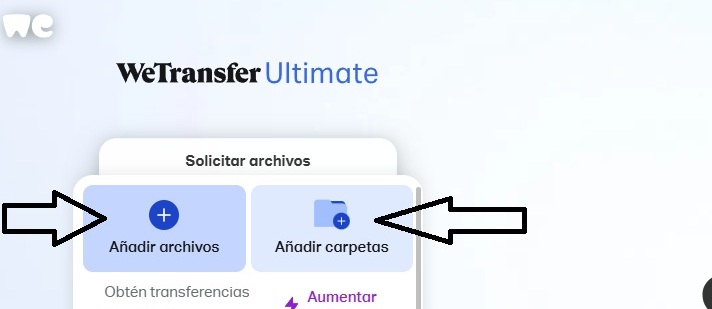
Select “+ Add files” or “+ Add folders”.
Upload or drag and drop your files or folders.
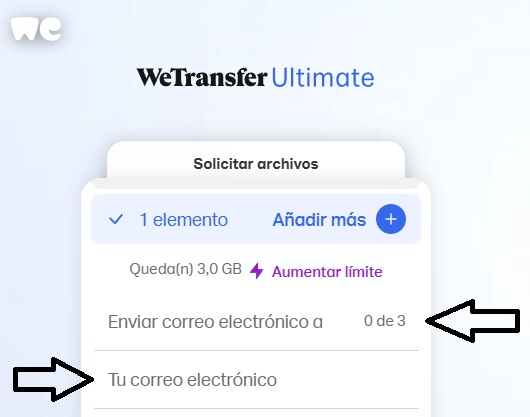
Enter your email address and the recipient's email address.
Select email as the delivery method by clicking on the three dots (···).
Click on the “Transfer” button.
Below, we detail each step for sending files by email with WeTransfer:
Step 1. Open your browser and go to the official page wetransfer.com. There you will see the main screen.
Step 2. Select “+ Add files” or “+ Add folders” in the small menu on the left.
Step 3. Enter the recipient’s email address in the next field (up to 10 on the free plan and 50 on paid plans, according to WeTransfer). Then, enter your own email to receive a confirmation once the transfer is complete.
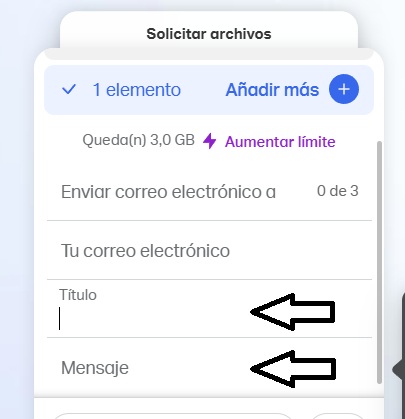
Step 4. Change the file title and write a message in the next fields, if you wish.
Step 5. Click on the three dots (···) and choose Email.
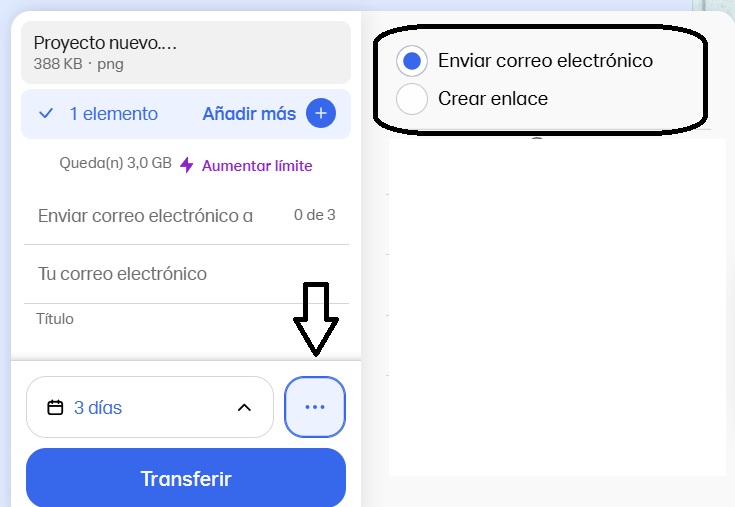
Step 6. Press the blue “Transfer” button.
If you don’t have a WeTransfer account, you will receive an email with a verification code. You must copy and paste it into the WeTransfer window to validate your transfer.
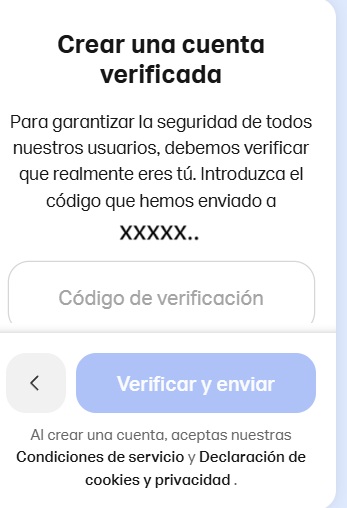
On the free plan, files stay available for up to 3 days.
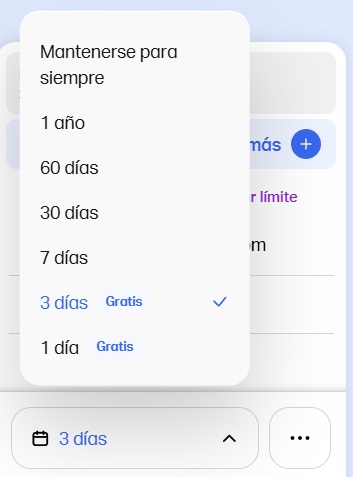
After that period, the file is automatically deleted.
Although it’s possible to send files for free with WeTransfer, here’s a comparison with its paid options for individual use:
Free | Starter | Ultimate | |
Data per month | 3 GB | 300 GB | No limit |
Transfers per month | 10 | 10 | Unlimited |
Link expiry | Up to 3 days | Up to 3 days | No limit |
Use | Individual, non-commercial | Individual | Individual |
Source: WeTransfer pricing, checked on November 25, 2026.
Very secure, according to what is published on their website, where we see 2 key points:
1. ISO/IEC 27001 Certification. An international standard that guarantees strict compliance with data handling processes.
2. Encryption in transit and at rest. Files are sent under TLS (Transport Layer Security) protocols.
However, in the free version, advanced protection is not fully guaranteed, which is why we don’t recommend:
Using WeTransfer Free to share sensitive information (financial data, confidential legal documents, or passwords).
Skipping verification of the recipient’s email before sending.
Otherwise, it is safe for most personal, professional, and academic uses.
Aside from using WeTransfer to send files, you could try other online platforms, for example:
Google Drive, useful for storing and collaborating on documents long-term.
Dropbox, popular for fast synchronization between devices.
OneDrive, integrated into Microsoft’s ecosystem.
Smash, can send files without size limits.
Send Anywhere, offers transfers through a six-digit code or a link.
It’s worth mentioning that these options usually focus more on storage and collaboration. So, if what you’re after is speed and simplicity, WeTransfer keeps its essence: delivering files quickly.
This platform is very useful as a remote work tool. Also, if you look at the steps on how to send large files with WeTransfer, the process is quite simple. But that doesn’t mean issues can’t occur.
Here are some possible problems and their solutions:
The file exceeds the allowed limit. Compress the file into a ZIP folder, as long as the total stays within the 3 GB the free plan allows every 30 days. If it is still too large, split it into parts or use a paid plan.
The email was not received. The message with the link may end up in the recipient’s spam folder. Ask them to check it, confirm the address, or share a link instead.
Upload speed is very slow. This usually comes from the connection. You can:
Restart your browser, computer, and router.
Use the latest browser version.
Temporarily disable VPN, antivirus, or ad blockers and try again.
If the issue persists, contact WeTransfer’s support center.
WeTransfer is one of the fastest and simplest ways to send large files online. There’s nothing complex about using its interface, and it offers flexible plans.
As we mentioned at the start, it doesn’t store files like Google Drive or Dropbox. Its main purpose is to act as a temporary intermediary, making it ideal for quick, one-time deliveries.
There’s no doubt it’s very practical for sharing projects in just minutes, making it a useful option for students, freelancers, and creative professionals.
If you get paid by clients abroad, ARQ gives you your own US and EU account details to receive payments in USDs and EURc. On the Standard plan, each international payment costs USD 3 or EUR 3.
You don't need an account, but without one WeTransfer sends you a code to verify your email before the transfer goes out. Paid plans add higher limits and longer link expiry.
The free plan allows 3 GB and 10 transfers in any 30-day period, in total, not per transfer. WeTransfer also says it is for personal, non-commercial use; for client work it recommends a paid plan.
Yes, you can also send WeTransfer files from your phone, either through the mobile browser or the official app. The process is similar to the web version and is available for both iOS and Android.
Convert pesos to digital dollars or digital euros in seconds, at real market rates. Without hidden fees.
Canva, Visme, Miro, Piktochart and MyMap.ai for comparison charts: what each is good for and what you can download without paying.
We compare Google Password Manager and LastPass on encryption, sync and plans, and show how to move your passwords from one to the other.

What Trello is, what its free plan includes in 2026 (10 boards and 10 collaborators per Workspace) and a client board you can copy.
Scan the code and join ARQ.
2 million people around the world already manage their finances with ARQ.